Posts

Top 3 Ways on How to Hack Facebook Account [Updated 2017]

There are number of reasons why you want to have access to your friend or enemy's facebook account. Today I'll share to you the top 3ways on  how to hack facebook account . Before we continue with our tutorial and tips, make sure that you are 100% sure that you're doing this. This will have a lot of consequences in the future. If you're convinced that it's really necessary to  hack facebook account  to save someone or to fix your life, go ahead and keep on reading this article. Method 1 If you have access to your victim's computer or laptop, you can check his password on his browser.  Open Google Chrome or Firefox browser. Find the settings and search "Password". Type Facebook From the list, you should find the username and password of the user. Click the option to view password. Note: You may need to type the computer password to view this. Copy the password somewhere Method 2 If you're not familiar with phishing, this is a trick wh...

Be the Very First to Read What the Experts Think About Life Insurance in Philippines

The loan officer may ask to confirm your income to be sure you're making what you say you're making. These five excellent investment characteristics might be very good screening device for possible investments and excellent variables to consider when investing. The very first obvious advantage of shared ownership is acquisition price. Business debt is another long-term investment acceptable for investors within this group. AIG did not get that agents which sell annuities and term insurance aren't loyal. The funds will be utilised to settle the Fed's loans. What You Don't Know About Life Insurance in Philippines That is a no face-to-face conversation in the beginning in this type of communication. After working through school, you'll have made several contacts in addition to built a deep network of feasible employers. There are a number of reasons why you may want another passport. The Chronicles of Life Insurance in Philippines In any scenario, availing ...

How to cancel order in Lazada? [Step-by-Step]

Image
Lazada is the Amazon of Asia. Great and fake products are just few clicks away.  Big discounts is really attracting buyers to buy item. But sometimes we make mistakes and you want to cancel your order in Lazada . Is this possible? My answer is a quick yes . But... As long as your purchased item is not yet done with processing, you can still request to cancel your order. Here's the steps to cancel your order in Lazada. Login to your account or click here.  Click "My Orders" Select Cancel. If you can't see the cancel button. It means you can't cancel your order anymore. Fill out the form and click Next Wait for atleast 60 minutes to changes the status of your order to cancel. You may want to refresh the page from time to time. You can check the status of your cancel product on the left sidebar. What will you do if you can't see the cancel button? It simply means that your package is ready and packed. Don't loose hope. Try to call La...

Wikibuy Review: 13 Warnings & Facts (2017)

What is Wikibuy? Well, it's a Google Chrome Add-on that give you easy access to buy a product with the best deal to offer. A lot of people are skeptical about it. That's the reason why I decided to compile all Wikibuy reviews in one place. This browser extension will compare all the price and information of a certain item giving you a summary and option to pick the best deal. Sound cool and interesting right? But what's the catch? A subscription fee? Is this safe to use? 1. Wikibuy is Free You can download Wikibuy for free. The company earns money from retailers. When you view products from eBay and Wikibuy shows better options from Amazon. They will get money from Amazon, not from their customers. 2. Wikibuy Features Wikibuy is the first of its kind and no one attempted to make a similar software or browser add-on. Checkout the main features of Wikibuy below. Instant Savings - you can see options on all sellers instantly while viewing the product. Express ch...

[SOLVED] How to Type ENYE

Image
Wanna know how to type enye in laptop or desktop? Are you struggling to type enye in your keyboard? How to Type enye on Windows Computer This will work on desktop, laptop, windows 7, windows 8. windows 8.1, windows vista, and even windows XP.  For small letter enye: Press and hold the ALT key. Type 164 . Release the ALT key. For capital enye: Press and hold the ALT key. Type 165 . Release the ALT key. Amazing right? How to Type enye on Mac Now what if you're a conyo guy and you use a macbook or imac. Here's how it's done. For small letter enye: Press and hold the N key. Press 1 . For capital enye: Press and hold the Shift + N key. Press 1 . This pop up will show when you hold N key on mac computers This will also work for laptops without a numpad. Simply use the numbers above the letters. Hope that helps! Enjoy typing ñ or Ñ  Please leave a comment below if it works.

[RECOMMENDED] Ace Water Spa Attire and Dress Code

Image
If this is your first time to go to Ace Water Spa make sure to wear the proper dress code. Most of the time the staff are strict with dress code. You should pick your perfect attire to enjoy the spa. Swimming Attire For Male Fitted swim wear preferably made with spandex This can be a fitted trunks of cycling shorts Board shorts and basketball shorts are NOT allowed. Do not wear underwear Dress Code For Female I prefer bikini and sexy swimsuit You can wear rash guard with fitted cycling shorts  Fitted swimwear like boys. No underwear or bra. Attire For Kids Please don't use diaper Helpful tips before going to Ace Water Spa Bring your own towel. Renting swimwear and towels to hotel is very expensive Bring hair conditioner for women Print your voucher They provide liquid soap/shampoo. Bring if you're maarte They have plastic bags for wet swimwears Parking fee is 45 pesos. You can park on 5th or 6th floor Checkout the best s...

Lazada Hotline Philippines (2017) : Contact Customer Service 24/7

If you're looking for Lazada hotline number because you have concert regarding your order. You're in the right place. Lazada hotline number in Philippines is  (02) 795-8900 . But most of the time, the line is busy. Their customer service hotline isn't always available. They do not recommend contacting via landline. As an alternative you can try their 27/7 Online Chat Support. Click here . Quick Links that might help you. I want to track order in lazada I want to return items in Lazada I want to cancel my order As of the moment toll free numbers for lazada hotline isn't available anymore.

[COMPLETE GUIDE] Online Jobs Philippines | Things You Need To Know

Image
Getting online jobs in the Philippines is becoming popular. Almost everyone wants to work at home when this is a topic of conversation. Many of us would think that working at the comfort of your house while earning dollars is a cool thing. Only few we're successful... Majority got scammed... Most of them aren't qualified. Jejemons will ask "how poh" And now you're curious what it's all about? About Me and How I Become a Work at Home Rockstar I've been in the business of working while wearing only underwear since 2009. During that time only few Filipinos are working online. You have to explain every detail of your job to your friends and families. They're curious how you get your salary and stuff. I know you have those questions too. Take time reading this short article and all you will get enlightened like Buddha. Going back to my story, I started working as an actor but I got no luck. I learned that looks isn't the only thin...

Top 10+ Best Car Rental Companies in US

Image
Here's a list of the best car rental companies in the USA.  I've listed down the highest rated and most reviewed rent-a-car companies. It's important to know the best and worst car rental companies to avoid the hassle and enjoy your vacation with your family. Every time I travel to a different state, I always look for the best car rental companies near me. Here's a quick list of best car services for you to read on. Don't forget to find the best deal near you. Budget Avis Alamo Enterprise Rent-a-Car Hertz National Car Rental Thrifty Dollar Thrifty Ace Rent-a-Car Advantage Rent-a-Car Payless Now let's try to investigate why these car rental companies made in to our list. Remember that this is in order of overall rating. Budget Car Rentals I believe they offer the best car rental deals. They have the lowest price among our top list that only cost $35/day which is 23% less than its competitors. They even offer 20% OFF on weekend rentals whi...

Camella Homes Payment Terms

Are you planning to buy a house? Camella Homes is a popular option. Before contacting a realty agent, you must be aware of the payment terms. In this blog, I will share you my experience in Camella Homes. It's been 5 years since I decided to buy my own house. Camella homes is one of the cheapest option compared to other house developers. Camella Homes Payment Options 1. Bank Financing If you are qualified to get a home load to a bank go for it. A salary range is required by banks. Usually if you earn atleast 30,000 to 50,000 a month, you're qualified. But it will all depends on the bank and the amount of you loan. You can also check the home load section of your preferred bank.  Not all banks have partnerships with Camella. Some banks that are affiliated with them are BDO, Chinabank, RCBC, and Unionbank.  2. In-house Financing In some cases banks will decline your home application. If this is the case you will have the worst payment option. The interest rate is t...

What's the PLDT Fibr IP Address?

Image
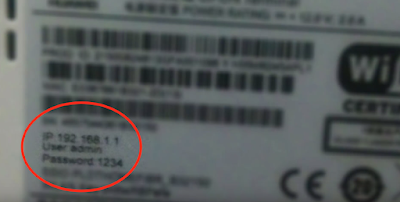
You may want to know the IP address of your PLDT Home Fibr Modem to change the default password . All modems are different and some tutorials may not work for you. The safest way to do is to check the modem itself. Normally, they put the IP address, user name, and password under the modem. IP address info under your modem If you can't find it, it's time to call the PLDT Fibr Hotline below: PLDT Landline and Smart and Talk 'N Text cellular phones: 171 For NON PLDT Landlines: (02)8888171 FIBR: 101-Fibr (3427) How to Change PLDT Fibr Password?

[SOLVED] How to Change Wifi Password PLDT Fibr 2017

Image
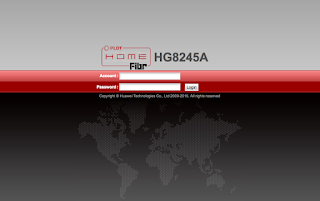
How to change wifi password in PLDT? Here's the step-by-step procedure to change your PLDT Home Fibr WiFi Password. Step 1. Check the IP, user name, and password of your modem. These information are listed under your modem. Step 2.  Login to your PLDT IP address. In my case, it's 192.168.1.1 Step 3.  Enter username and password Step 4.  Click the WLAN from the main navigation. Step 5.  Click WLAN Basic Configuration Step 6.  Change the SSID Name value. This is your WiFi name Step 7.  Change WPA PreSharedKey. This is your WiFi password. Step 8.  Click the Apply Button. After the steps above, you will disconnected since you have updated your wifi password and username. Simply connect to you new wifi name and use your new wifi password. If you're too lazy to follow my instruction watch the video below: Just in case you're still using PLDT Ultera, here's how you change PLDT Home Ultera Wifi Password If you're not sure if your subscript...

Lazada Philippines Cash On Delivery Review

I've been using Lazada to shop online for many years now. At first I was hesitant to use credit or debit cards in paying goods online specially if the seller don't have a good reputation yet. Filipinos are paranoid that online payment can cause a lot of trouble. The good thing about Lazada One of the reasons why lazada is a good choice in buying products online is they offer COD or cash on delivery,  in situations that your house is hard to find and your'e afraid to loose your payment online this is the best solution. I believe COD is the reason why Lazada becomes popular today plus most of the items are shipping free free! Lazada Warnings There are some instances that buyers didn't receive their items on time. You have to be patient and check the status of your order by logging in to your Lazada account. Is COD the best choice? I would recommend COD for first time buyers specially if your house is hard to find. But when you have bought a lot of items in la...

Klook Paypal Promo Code 2016

If you are looking for a Klook Paypal Promo Code , you're in the right place. Here's a quick guide on how to claim the promo code. First, you have to download the Klook App on Apple App Store or Android Play Store . For first time users, use this promo code to signup to Klook:  6F2C3 Klook Paypal Promo Code  If you will use paypal to purchase a ticket, use this promo code:  PAYPAL25 That's 2 promo codes in one transaction!

Can I upgrade my PLDT Ultera to PLDT Fibr?

Image
If you're wondering if you can upgrade your PLDT Ultera Plan to the latest and better PLDT Home Fibr the answer is YES! I'm still under the 3 year contract when I decided to switch to Fibr when it became available in my area. How to Upgrade PLDT Ultera to Fibr? First you need to go to the latest PLDT sales office. Bring a letter that explains why you want to upgrade. Make sure to mention that you're expecting to waive all pre termination fee since you're still in contract. In my experience it took about a month before my request was granted. My lastest PLDT ultera bill still have 250 pesos balance for the router modem installment. Just ignore it they should pull out if you're upgrading.

Is Lazada.com.ph legit? Yes! and here's my story

Image
If you're new to online shopping and wondering if Lazada.com.ph is legit. My answer is a big yes . I bought a lot of item from this online store and generally I was happy. I saved a lot of money if I will compare my experience in buying in a traditional shop in malls. Lazada.com.ph Advantages over Traditional Stores Lazada offers a lot of promos and discount and they are actually true. If you've seen amazing deals on facebook from a legit lazada page or advertisement don't waste time, you should grab them the first time you see them. Well, as long as you're interested on the product. Lazada.com.ph warnings Not all sellers sell genuine and high quality products. I've experienced buying a fake sun glasses. The item lookks really cheap and not as advertised. The good thing about Lazada is it's easy to return the item. How to return items in Lazada? Just print out the return item form from your account. You can also use the paper included on the package. Fil...

PLDT Fibr Review 2017

Image
Finally, here's my PLDT Fibr Review and experience. PLDT Fibr is currently the largest Fibr Network in the country and its still growing. It started on exclusive and conyo subdivisions and finally it has reached our simple village. I live near the border of Metro Manila and Bulacan and I'm glad that it reached us. PLDT Fibr Plans Currently these are the plan available when I applied for a connection Unlimited Plans Plan 1699  - Speed up to 5 Mbps Plan 1899 - Speed up to 20 Mbps Plan 2899 - Speed up to 50 Mbps Plan 3499 - Speed up to 50 Mbps with Cignal Cable Budget Plan Speed Plans Plan 1699 - Speed up to 15 Mbps with 150GB monthly volume allowance Plan 1899 - Speed up to 50 Mbps with 300GB monthly volume allowance This article will cover all reviews of these plans since all of them are powered by the same fiber technology. Installation It was October 2015 when I found out that PLDT is already installing fibr wire in a subdivision near me. After a few week...

Life Hack: Download Stock Photos on Shutterstock, Istock, and more for FREE

Image
You don't need to learn how to hack a shutterstock account to get free stock photos. In a simple trick you can remove those water mark and have a stock photo for your project. This method has this following limitations: You can't get all the images in Shutterstock or iStock photos. Sometimes you can only get a medium size resolution If the photo you're looking for is not common, you can't get it. This my favorite trick to do everytime I want to get a free stock photo from the largest online store of photos like Shutterstock and iStock. Steps to get free stock photos Go to your favourite stock photo web site. Find the image that you want. If the filters allow you to show the most downloaded photos or the popular ones, you should enable that. Right click the image and click copy image url (location) or something similar to that, depending on your browser.  Go the http://images.google.com   Click the small camera icon and paste the url of the image.  When ...

PLDT Ultera Review 2017

Image
It's more than a year now since I subscribed to this so called "super fast LTE" by PLDT. Here's my honest and no bias review. So here's my PLDT ultera review. It was February 2015 when I applied a PLDT Homebro Ultera Plan in PLDT Office in Fairview, Quezon City. The dark guy entertained me and processed my application. After a few days the installers visited my house to install the external router. the actual logo of PLDT Home Ultera Everything went well (at first) For the first month, I was so happy. I'm getting an average speed of 5Mbps even if my plan's max speed is only 3Mbps. During that time, Plan 999 will give you a speed of 3Mbps and after you reach your limit which is 300MB per day, your speed will be throttled to 30% of your max speed. So I'm expecting around 0.9Mbps once I reached the limit. I'm wondering why I didn't get the slower speed even if I download large files, stream funny Youtube Videos  and play DOTA. I ...