Posts

Showing posts with the label pldt

What's the PLDT Fibr IP Address?
Image
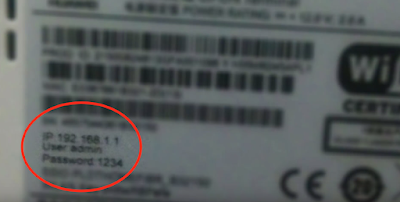
You may want to know the IP address of your PLDT Home Fibr Modem to change the default password . All modems are different and some tutorials may not work for you. The safest way to do is to check the modem itself. Normally, they put the IP address, user name, and password under the modem. IP address info under your modem If you can't find it, it's time to call the PLDT Fibr Hotline below: PLDT Landline and Smart and Talk 'N Text cellular phones: 171 For NON PLDT Landlines: (02)8888171 FIBR: 101-Fibr (3427) How to Change PLDT Fibr Password?
[SOLVED] How to Change Wifi Password PLDT Fibr 2017

Image
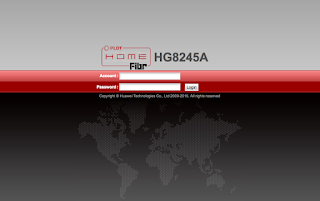
How to change wifi password in PLDT? Here's the step-by-step procedure to change your PLDT Home Fibr WiFi Password. Step 1. Check the IP, user name, and password of your modem. These information are listed under your modem. Step 2.  Login to your PLDT IP address. In my case, it's 192.168.1.1 Step 3.  Enter username and password Step 4.  Click the WLAN from the main navigation. Step 5.  Click WLAN Basic Configuration Step 6.  Change the SSID Name value. This is your WiFi name Step 7.  Change WPA PreSharedKey. This is your WiFi password. Step 8.  Click the Apply Button. After the steps above, you will disconnected since you have updated your wifi password and username. Simply connect to you new wifi name and use your new wifi password. If you're too lazy to follow my instruction watch the video below: Just in case you're still using PLDT Ultera, here's how you change PLDT Home Ultera Wifi Password If you're not sure if your subscript...

Can I upgrade my PLDT Ultera to PLDT Fibr?

Image
If you're wondering if you can upgrade your PLDT Ultera Plan to the latest and better PLDT Home Fibr the answer is YES! I'm still under the 3 year contract when I decided to switch to Fibr when it became available in my area. How to Upgrade PLDT Ultera to Fibr? First you need to go to the latest PLDT sales office. Bring a letter that explains why you want to upgrade. Make sure to mention that you're expecting to waive all pre termination fee since you're still in contract. In my experience it took about a month before my request was granted. My lastest PLDT ultera bill still have 250 pesos balance for the router modem installment. Just ignore it they should pull out if you're upgrading.

PLDT Fibr Review 2017

Image
Finally, here's my PLDT Fibr Review and experience. PLDT Fibr is currently the largest Fibr Network in the country and its still growing. It started on exclusive and conyo subdivisions and finally it has reached our simple village. I live near the border of Metro Manila and Bulacan and I'm glad that it reached us. PLDT Fibr Plans Currently these are the plan available when I applied for a connection Unlimited Plans Plan 1699  - Speed up to 5 Mbps Plan 1899 - Speed up to 20 Mbps Plan 2899 - Speed up to 50 Mbps Plan 3499 - Speed up to 50 Mbps with Cignal Cable Budget Plan Speed Plans Plan 1699 - Speed up to 15 Mbps with 150GB monthly volume allowance Plan 1899 - Speed up to 50 Mbps with 300GB monthly volume allowance This article will cover all reviews of these plans since all of them are powered by the same fiber technology. Installation It was October 2015 when I found out that PLDT is already installing fibr wire in a subdivision near me. After a few week...

PLDT Ultera Review 2017

Image
It's more than a year now since I subscribed to this so called "super fast LTE" by PLDT. Here's my honest and no bias review. So here's my PLDT ultera review. It was February 2015 when I applied a PLDT Homebro Ultera Plan in PLDT Office in Fairview, Quezon City. The dark guy entertained me and processed my application. After a few days the installers visited my house to install the external router. the actual logo of PLDT Home Ultera Everything went well (at first) For the first month, I was so happy. I'm getting an average speed of 5Mbps even if my plan's max speed is only 3Mbps. During that time, Plan 999 will give you a speed of 3Mbps and after you reach your limit which is 300MB per day, your speed will be throttled to 30% of your max speed. So I'm expecting around 0.9Mbps once I reached the limit. I'm wondering why I didn't get the slower speed even if I download large files, stream funny Youtube Videos  and play DOTA. I ...

[SOLVED] How to Change Wifi Password of PLDT Ultera 2017

Image
Here's a quick guide for modifying Ultera Wifi name and password. How to edit/modify SSID of PLDT Homebro Ultera? Go to PLDT Ultera IP Address http://192.168.22.1 Username: homebro and password is homebro Click Wireless > Basic Settings Change the value of SSID with your new wifi name Click Modify How to change Wifi Password of PLDT Homebro Ultera? Go to http://192.168.22.1 Username: homebro and password is homebro Click Wireless > Security Change the value of Pre-Shared Key with your new password Click Modify NOTE: You will be disconnected when you’re connected to wifi because you changed your wifi name or password. Don’t forget your new wifi name and password. If you are too lazy to read this article the video below will help you: Helpful links in the future: 1. How to Change Wifi Password Pldt Fibr 2. PLDT Home Fibr Review 3. Can I upgrade my PLDT Ultera to PLDT Home Fibr?